Required disclosures
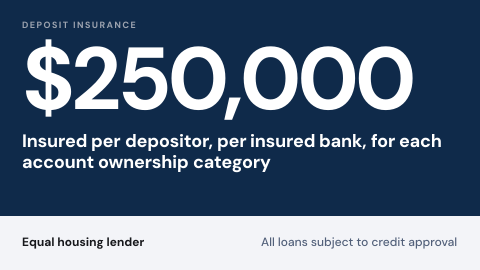
Required disclosures are the deposit insurance and fair lending notices a bank shows on its branch digital signage, next to the products they cover. They change rarely, but they have to be on the right screens, in the approved wording, every day.
Updated
- Owned by
- Compliance
- Content from
- Approved files
- Seen by
- Customers in the branch
- Where it hangs
- Lobby, teller line, new accounts desk
What is on the screen
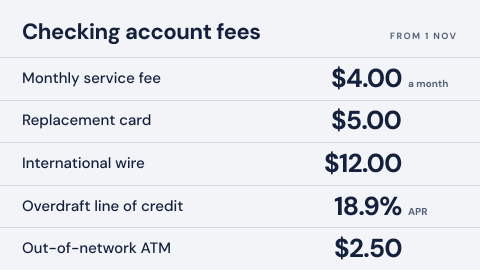
- 1The deposit insurance statement in its approved wording, with the coverage amount.
- 2The fair lending line, such as equal housing lender, where loans are offered.
- 3Room for a product slide around it, so the notice sits with the product it applies to.
How to do it in Screenly
Disclosures are fixed wording that compliance approves and rarely changes, so the simplest source is the best one.
- Best fit Image
Export the approved notice as an image, the same file compliance signed off. Put it in the playlist for every branch screen, and add it to product slides where the notice has to appear with the product.
Image docs - Also works Web page
If disclosures already live on a page your web team maintains, show that page. Check it renders for a wall screen first, since a page built for a laptop has small text.
Web page docs - Not a fit Video
A notice has to be readable the whole time it is on screen, and a video that animates it in or out is not. Keep notices as stills.
- Not a fit App
Nothing on a disclosure changes on its own, so an app adds a moving part without a reason.
What plays with it
Branch lobby screens rarely show one thing. A typical loop puts the rates next to the notices and offers that go with them, each for as long as it takes to read.
One loop: 45 seconds
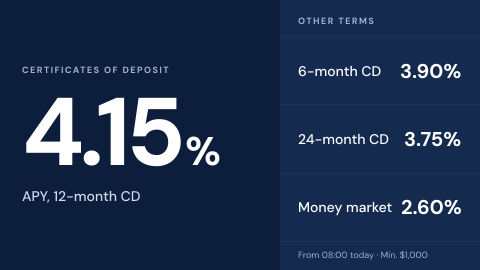 Branch rate board
15 s
-
Required disclosures
10 s
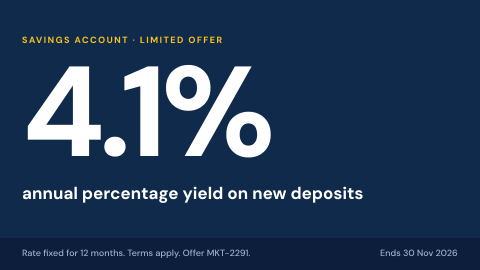 Promotion with approval trail
10 s
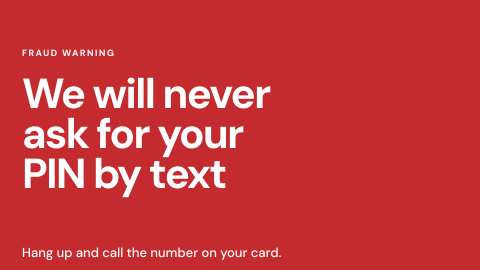 Fraud and phishing awareness
10 s
Keeping it right
The notice is on every branch screen
One playlist with the notice goes to every screen labeled as a branch, so a new screen picks it up the moment it gets the label.
New wording replaces the old everywhere
When compliance approves new wording, replacing the file in the playlist changes it on every screen that plays it.
A wrong notice comes off at once
A priority playlist plays alone on the screens it targets until its schedule ends, so a corrected notice can take over while the fix goes in.
Security
This screen needs no credentials: the approved file plays from the device, and only people with a role in the workspace can change it.
How Screenly keeps credentials secureWhat a review will ask
Disclosures are where a bank's review is strictest. These are the questions to expect.
- Where does the deposit insurance sign have to appear?
- The FDIC's official sign rules (12 CFR part 328) set where the sign and its wording appear, including on digital channels. Whether a lobby screen can stand in for a printed sign is a question for your compliance team.
- Who changed it, and when?
- Enterprise accounts have audit logs: each action a user took and when they took it.
- Who can change it?
- Each workspace has four roles, Owner, Admin, Billing Manager and User, and access can be given an end date. A branch or region can have a workspace of its own.
Sources
- FDIC official sign rules, 12 CFR part 328deposit insurance signs
- Imagesformats and export size
- Labelstargeting screens by branch or region
- Priority overridea playlist that takes over the screen
- Screenly Enterpriseaudit logs