Market and trading floor tickers
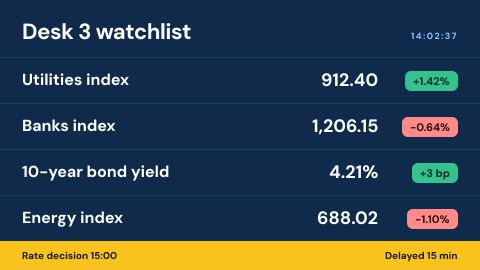
A trading floor ticker is a digital signage screen that shows licensed market data to a desk: indices, yields and the prices the desk watches. The data comes under a licence that often counts screens, so where it shows matters as much as what it shows.
Updated
- Owned by
- Trading
- Content from
- A licensed market data feed
- Seen by
- Staff on the trading floor
- Where it hangs
- Trading floor, dealing room
What is on the screen
- 1The instruments the desk watches, each with its price and change.
- 2Whether the data is live or delayed, as the licence requires.
- 3The day's scheduled events, such as a rate decision.
How to do it in Screenly
Market data is live and licensed, so it comes through a source that holds the licence key.
- Best fit App
Build your own app on your data vendor's API, or pick one from the app store if one fits. The vendor's key is stored encrypted and never appears in the page source, and the app decides what to show if the feed drops.
App docs - Also works Web page
If your vendor offers a display page for wall screens under your licence, show that page. It is skipped if it cannot load.
Web page docs - Not a fit Image
A picture of prices is wrong a second later.
- Not a fit Video
Market data cannot be recorded and replayed as if it were live.
Keeping it right
Only the screens that are licensed show it
Trading floor screens carry their own label, and the market data plays only on those.
The screen count is easy to give
The screens page lists every screen, and with its Labels column on, shows which ones carry the trading floor label: the count a data vendor asks for.
The data stays on the floor
A separate workspace for the trading floor keeps its screens and content apart from the branch network.
Security
The data vendor's key is stored as a secret, encrypted for each screen, and the trading floor's screens can sit in a workspace of their own.
How Screenly keeps credentials secureWhat a review will ask
Market data reviews start with the licence and the network.
- Does the licence cover these screens?
- Market data licences often charge per display and set where the data may be shown. Check the terms with your data vendor before adding screens.
- Who can see and change the trading floor screens?
- A workspace has its own members, and each workspace has four roles. Access can be given an end date.
- Who changed it, and when?
- Enterprise accounts have audit logs: each action a user took and when they took it.
Sources
- Settings and secretshow app credentials are stored
- Appswhat an app does when its source is unreachable
- Labelstargeting screens by branch or region
- Screenly Enterpriseaudit logs
- How Screenly keeps credentials securehow Screenly handles secrets, certificates and private networks