Fees and terms schedule
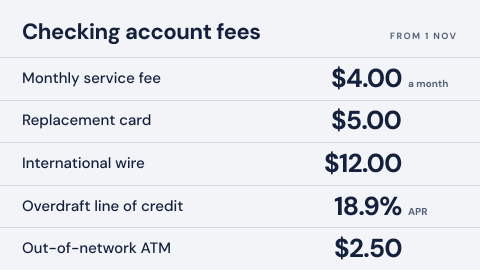
A fee schedule is the table of account fees a bank shows on its branch digital signage, so customers can see what an account costs before they open one. It has to match the published schedule, and switch on the day new fees take effect.
Updated
- Owned by
- Compliance
- Content from
- The published fee schedule
- Seen by
- Customers in the branch
- Where it hangs
- Lobby, new accounts desk
What is on the screen
- 1Each fee with its amount, in the order of the published schedule.
- 2Rates next to the products that charge them, such as the APR on an overdraft line.
- 3The date the schedule took effect.
How to do it in Screenly
Fees change a few times a year on a set date, so the board is a still that changes on schedule.
- Best fit Image
Export the schedule from the same source as the printed and online versions, so the three always match. Schedule the new image to start on the day the new fees do.
Image docs - Also works Web page
If the fee schedule is a page on your website, show that page and the board updates when the website does. Check the page is readable from across a room.
Web page docs - Not a fit App
Fees do not move through the day, so a live source adds nothing an image does not.
- Not a fit Video
A fee table needs time to read, and a video moves on. Keep it as a still.
Keeping it right
New fees start on their date
The new schedule is set to start on the date it takes effect and the old one to end the day before, so the switch happens overnight in every branch.
One file for every branch
The same image goes to every screen labeled as a branch, so no branch shows last year's fees.
Regional fees stay regional
Where fees differ by region, each region's screens carry a label, and each schedule plays only on its own region's screens.
Security
This screen needs no credentials: the approved file plays from the device, and only people with a role in the workspace can change it.
How Screenly keeps credentials secureWhat a review will ask
Fee disclosures are reviewed like any other customer disclosure.
- Does the board have to match the printed schedule?
- It should, and the simplest way is to export both from one source. Regulation DD covers fee disclosures for deposit accounts in the US; agree with your compliance team how a branch screen fits.
- Who changed it, and when?
- Enterprise accounts have audit logs: each action a user took and when they took it.
- Who can change it?
- Each workspace has four roles, Owner, Admin, Billing Manager and User, and access can be given an end date. A branch or region can have a workspace of its own.
Sources
- Regulation DD, 12 CFR part 1030Truth in Savings
- Imagesformats and export size
- How scheduling worksstart and end dates on playlists
- Labelstargeting screens by branch or region
- Screenly Enterpriseaudit logs