Currency exchange rates
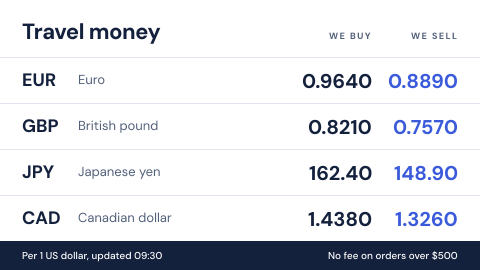
A currency exchange board is a digital signage screen in a bank branch that shows the buy and sell rates for travel money, with the time they were set. Rates move through the day, so the board has to follow the feed and stop showing figures it cannot confirm.
Updated
- Owned by
- Treasury
- Content from
- A market or treasury rates feed
- Seen by
- Customers in the branch
- Where it hangs
- Travel money counter, window
What is on the screen
- 1Each currency with its buy and sell rate, against the US dollar.
- 2The time the rates were set, so a customer knows how fresh they are.
- 3Any fee terms that apply, such as no fee above an order size.
When the data stops
Exchange rates are prices, and a price the bank cannot confirm should not be on the wall. When the feed stops, an app can take the figures down.
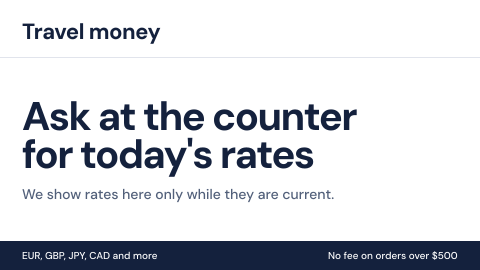
- Feed answering: buy and sell rates with the time they were set.
- Feed down: no figures, and customers are sent to the counter.
How to do it in Screenly
Exchange rates change through the day, so the board needs live data, and what it does when the data stops matters as much as what it shows.
- Best fit App
Pick an app from the app store if one fits your rates feed, or build your own. An app can stop showing rates, or show "Ask at the counter for today's rates", when the feed stops answering. The feed's key is stored encrypted and never appears in the page source.
App docs - Also works Web page
If treasury already publishes the rates on a page, show it. If the page cannot load, the screen skips it until it can.
Web page docs - Not a fit Image
An image of rates is out of date the moment the market moves, and nothing tells the customer so.
- Not a fit Video
Rates are figures to read, not something to watch, and a video cannot change with the market.
Keeping it right
The time is on the board
Every rate shows when it was set, so an old figure is obvious to staff and customers.
No feed, no rates
An app can hide the rates when the feed stops, instead of leaving the last ones up.
Only branches that exchange money show it
Screens at branches with a travel money counter carry a label, and the board plays only there.
Security
The feed's key is stored as a secret, encrypted for each screen, and never appears in the page source.
How Screenly keeps credentials secureWhat a review will ask
Exchange rates on a screen are prices, and they are reviewed as prices.
- What has to be shown with the rates?
- Usually both the buy and the sell rate, any fee or commission, and when the rates were set. Pricing rules differ by country, so agree the wording with your compliance team.
- Who changed it, and when?
- Enterprise accounts have audit logs: each action a user took and when they took it.
Sources
- Appswhat an app does when its source is unreachable
- Web pageshow pages are shown, refreshed and signed in to
- Status and syncwhat plays while a screen is offline
- Labelstargeting screens by branch or region
- Screenly Enterpriseaudit logs
- How Screenly keeps credentials securehow Screenly handles secrets, certificates and private networks