Contact center wallboard
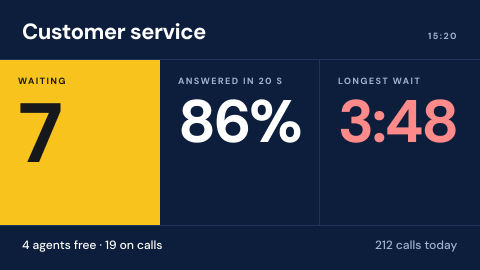
A contact center wallboard is a digital signage screen on the contact center floor that shows calls waiting, service level and how many agents are free, so the team can react before the queue builds. It shows the phone system's live figures, and only to the people on that floor.
Updated
- Owned by
- Contact center
- Content from
- The phone system (ACD)
- Seen by
- Staff on the contact center floor
- Where it hangs
- Contact center floor, team leader desks
What is on the screen
- 1Calls waiting, the number the floor watches most.
- 2Service level, such as the share answered in 20 seconds, against target.
- 3The longest wait and how many agents are free.
How to do it in Screenly
Wallboard figures change every few seconds and come from the phone system, so the board shows its live data.
- Best fit Web page
Most phone systems have a wallboard page of their own. Show it, signed in through one of the ways for pages behind a login, so the figures are the system's own.
Web page docs - Also works App
If the figures are in Power BI, Grafana or Salesforce, use that app. Otherwise build your own app on the phone system's API, with its key stored encrypted.
App docs - Not a fit Image
A picture of a queue is out of date before it reaches the screen.
- Not a fit Video
There is nothing to watch, only live figures to read.
Keeping it right
Only the floor sees it
Contact center screens carry their own label, and the wallboard plays only there.
No login typed into a screen
Pages behind a sign-in are shown through the browser extension, JavaScript injection or client certificates, never a password on the device.
Announcements fit around it
Team news can share the playlist, and a priority playlist takes over for an outage message.
Security
A wallboard page can check each screen's device certificate on ScreenlyOS, so no shared login sits on a screen in the contact center.
How Screenly keeps credentials secureWhat a review will ask
Reviews of a wallboard ask who can see the figures and how it signs in.
- Can customers or other staff see the wallboard?
- Only screens with the contact center label play it. A separate workspace keeps the floor's screens apart from the rest.
- Who changed it, and when?
- Enterprise accounts have audit logs: each action a user took and when they took it.
Sources
- Pages behind a sign-inbrowser extension, JavaScript and client certificates
- Connected servicescalendar and dashboard connections
- Labelstargeting screens by branch or region
- Priority overridea playlist that takes over the screen
- Screenly Enterpriseaudit logs
- How Screenly keeps credentials securehow Screenly handles secrets, certificates and private networks