Card skimmer and ATM notices
ATM safety notices are digital signage warnings at a bank's self-service machines that tell customers how to spot a card skimmer and what to do if they find one. The message rarely changes, until a skimmer turns up and every branch needs a warning that day.
Updated
- Owned by
- Security
- Content from
- Approved artwork
- Seen by
- Customers at the ATMs
- Where it hangs
- ATM lobby, drive-up, next to self-service machines
What is on the screen
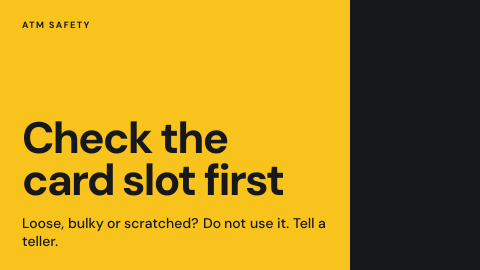
- 1One check customers can do in a second, such as checking the card slot.
- 2What a tampered machine looks like.
- 3What to do next: do not use it, and tell a teller.
How to do it in Screenly
The everyday notice is a fixed message. A new skimmer warning is the same kind of content, just urgent.
- Best fit Image
Show the approved warning as an image on the screens by the machines. When a skimmer is found, a new image with the details goes out as a priority.
Image docs - Also works Video
A short clip of how to check a card slot shows customers what to look for. Keep it short and without sound.
Video docs - Not a fit Web page
A warning should not depend on a page loading; if it cannot load, it is skipped and the screen shows nothing about it.
- Not a fit App
Nothing here changes on its own, so an app adds a moving part without a reason.
Keeping it right
Only screens by the machines show it
Screens next to ATMs carry a label, and the notice plays there and not in the lobby.
A new warning goes out at once
When a skimmer is found, a priority playlist puts the warning on those screens alone until its schedule ends.
It comes down on its own
The urgent warning is scheduled to end, so it does not stay up after the threat has passed.
Security
This screen needs no credentials: the approved file plays from the device, and only people with a role in the workspace can change it.
How Screenly keeps credentials secureWhat a review will ask
Security teams ask how fast a warning reaches every branch.
- How quickly can a warning reach every branch?
- As fast as the screens collect the change. A screen that is offline collects it as soon as it reconnects.
- Who changed it, and when?
- Enterprise accounts have audit logs: each action a user took and when they took it.
Sources
- Imagesformats and export size
- Labelstargeting screens by branch or region
- Priority overridea playlist that takes over the screen
- Status and syncwhat plays while a screen is offline
- Screenly Enterpriseaudit logs