Branch rate board
A branch rate board is a digital signage screen in a bank branch that shows today's deposit and loan rates, on the lobby, window and drive-up screens of every branch and changed from one place. A rate on a branch screen is an advertised rate, so the board has to change the moment the rate does, and show only the rates that branch offers.
Updated
- Owned by
- Product and compliance, with branch operations
- Content from
- A rates feed, a published spreadsheet or an image
- Seen by
- Customers in and outside the branch
- Where it hangs
- Lobby, window, drive-up
What is on the screen
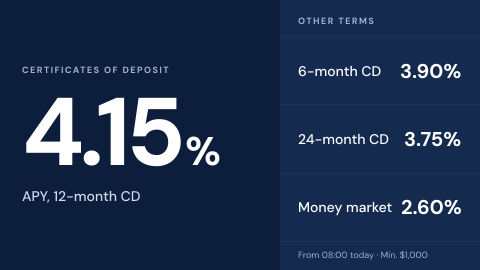
- 1The headline rate, such as a 12-month CD, large enough to read from the door.
- 2The other terms and products beside it, each with its rate, so the headline is never the only number a customer sees.
- 3The terms that belong to the rates: the annual percentage yield (APY), the minimum deposit, and the time the rates took effect.
When the data stops
A rate board that cannot reach the rates system should not keep showing the last rates it had. An app can switch to a line that sends customers to a banker instead.
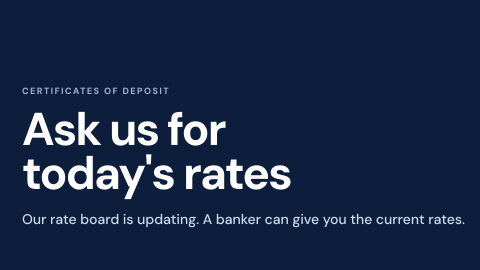
- Rates current: the board shows what the rates system returned.
- Rates system unreachable: the app hides the figures and points to a banker.
How to do it in Screenly
How often the rates change decides how the board is fed. Rates that move with the market or differ by branch need live data, which means an app or a web page. Rates that change by hand a few times a month are simplest as an image.
- Best fit App
For rates from your rates system. Pick an app from the app store if one fits, or build your own. An app decides what happens when the rates cannot be fetched: skip its turn, or show a line such as "Ask us for today's rates" instead of an old number. Its API key is stored encrypted and never appears in the page source.
App docs - Also works Web page
For rates already published on a page or in a spreadsheet. Each screen tells the page which branch it is in, so one page shows every branch its own rates. If the page cannot load, the screen skips it until it can.
Web page docs - Also works Image
For rates set by hand a few times a month. Export the board as an image, schedule it to end on the day the rate does, and add the next one ahead of the change.
Image docs - Not a fit Video
A video is fixed once it is made, so every rate change means making and uploading it again, and an old video left in a playlist shows an old rate. Keep video for a product film between rate slides.
What plays with it
Branch lobby screens rarely show one thing. A typical loop puts the rates next to the notices and offers that go with them, each for as long as it takes to read.
One loop: 45 seconds
-
Branch rate board
15 s
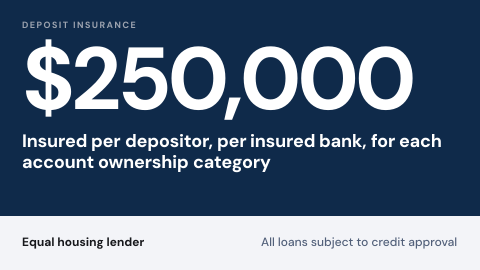 Required disclosures
10 s
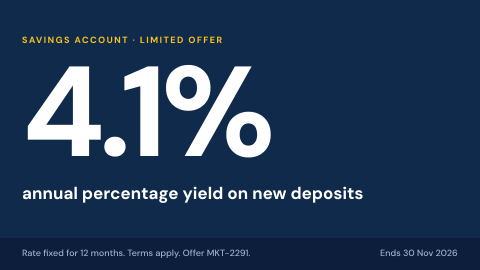 Promotion with approval trail
10 s
 Fraud and phishing awareness
10 s
Keeping it right
Each branch shows its own rates
Screens carry a label for their branch or region. Playlists target the labels, and an app or a page reads them to show that branch's rates.
A rate ends on its own
Each rate is scheduled with the dates it is valid. When the end date passes it stops playing, so no branch shows an expired rate because someone forgot to take it down.
A correction takes over at once
If a rate has to come off the screens now, a priority playlist plays alone on those screens until its schedule ends, then the normal playlists resume.
Security
The rates system's key is stored as a secret, encrypted for each screen, and never appears in the page source. A rates service on your private network is reachable over Tailscale on ScreenlyOS screens.
How Screenly keeps credentials secureWhat a review will ask
Bank vendor reviews look at the board as advertising. These are the questions that come up, and where the answers are.
- Who changed a rate on the board, and when?
- Enterprise accounts have audit logs: each action a user took and when they took it.
- Can anyone outside the rates team change it?
- Each workspace has four roles, Owner, Admin, Billing Manager and User, and access can be given an end date. A branch or region can have a workspace of its own.
- Which rate was showing, and since when?
- Keep the rate history in the rates system the board reads from. When the board shows a page or an app fed by that system, its history is the history of what the board said.
- Does a rate on the board need terms next to it?
- Rate advertising rules, such as Regulation DD in the US, can require terms next to an advertised rate, and how they apply to an in-branch screen differs by country. Agree the wording with your compliance team before the board goes live.
Sources
- Regulation DD, 12 CFR part 1030Truth in Savings
- Appswhat an app does when its source is unreachable
- Web pageshow pages are shown, refreshed and signed in to
- Labelstargeting screens by branch or region
- How scheduling worksstart and end dates on playlists
- Priority overridea playlist that takes over the screen
- Screenly Enterpriseaudit logs
- How Screenly keeps credentials securehow Screenly handles secrets, certificates and private networks
Related use cases
All banking use cases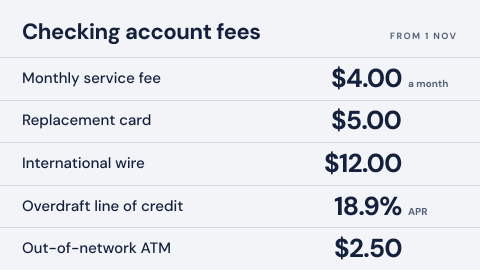 Fees and terms schedule
The fee table customers are entitled to see.
-
Required disclosures
Deposit insurance and fair lending notices.
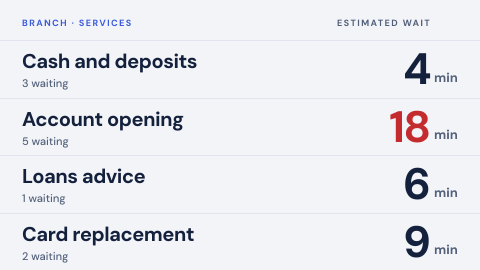 Queue status by service
Waiting count and expected wait per service, kept honest.